
概要
認可エラーをハンドリングする方法についてまとめた。
前提
以下の記事の続きとなる。
概要 特定のURLに対して認可ポリシーを定義して、アクセス制御を行う方法についてまとめた。 前提 以下の記事の続きとなる。

認可エラーハンドリング
認可ポリシーで許可されていないURLにアクセスすると、認可エラーがスローされる。
例えば、「/admin/*」へのアクセスが許可されていないユーザーが、このURLへアクセスすると認可エラーが発生する。
認可エラーが発生した場合、Spring Security内部では以下の流れで処理を行う。
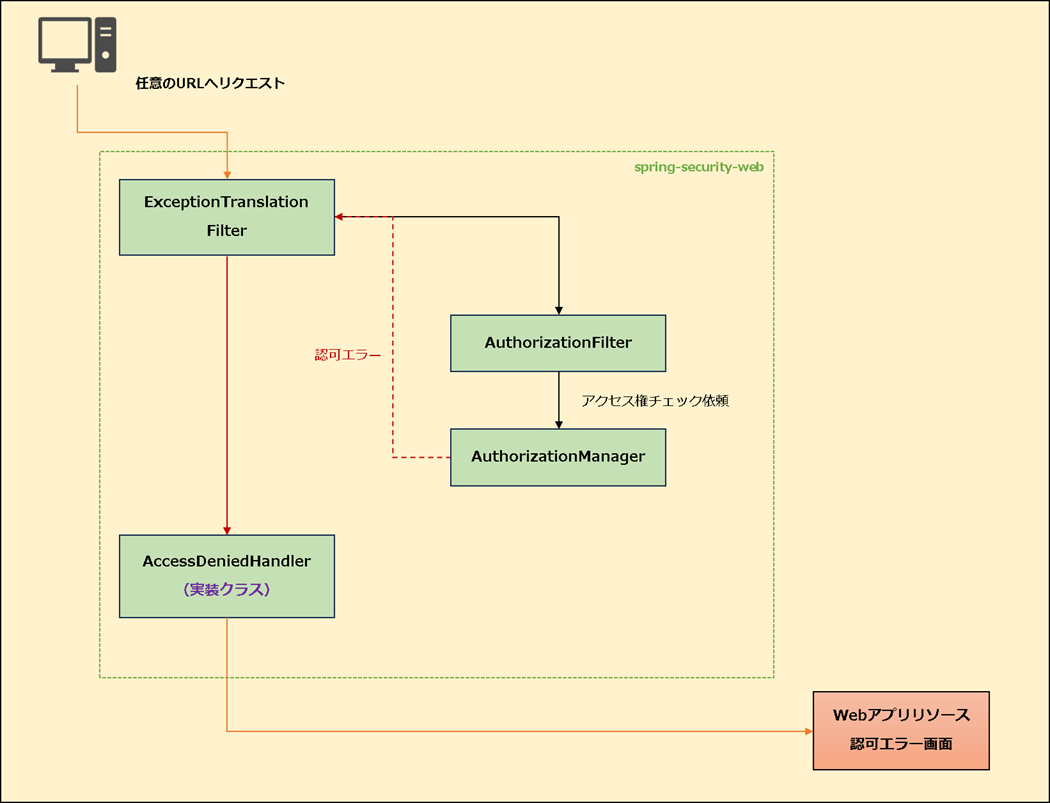
② ExceptionTranslationFilterにてキャッチしてAccessDeniedHandlerに処理を委譲する
③ AccessDeniedHandler(デフォルトはAccessDeniedHandlerImpl)が呼ばれ、レスポンスを返却する
実装
認可エラー画面に遷移させるAccessDeniedHandlerを実装して、ExceptionTranslationFilterに紐づける。
AccessDeniedHandlerの実装
認可エラーとなった場合、認可エラー画面にリダイレクトさせる。
CustomAccessDeniedHandler.java
package com.example.prototype.biz.security.handler;

import java.io.IOException;

import javax.servlet.ServletException;
import javax.servlet.http.HttpServletRequest;
import javax.servlet.http.HttpServletResponse;

import org.slf4j.Logger;
import org.slf4j.LoggerFactory;
import org.springframework.security.access.AccessDeniedException;
import org.springframework.security.web.access.AccessDeniedHandler;

public class CustomAccessDeniedHandler implements AccessDeniedHandler {
    /** ロガー */
    private static final Logger logger = LoggerFactory.getLogger(CustomAccessDeniedHandler.class);

    @Override
    public void handle(HttpServletRequest request, HttpServletResponse response,
            AccessDeniedException accessDeniedException) throws IOException, ServletException {

        logger.debug("認可エラー");
        response.sendRedirect(request.getContextPath() + "/system/error?code=403");
    }

}
AccessDeniedHandlerを実装したクラスを作成する。
尚、DIを行わない場合はコンポーネント化不要。
public void handle(HttpServletRequest request, HttpServletResponse response,
ExceptionTranslationFilterにて呼ばれるhandleメソッドをオーバーライドする。
認可エラー時のリダイレクト処理を実装する。
ExceptionTranslationFilterへ紐づけ
カスタマイズしたAccessDeniedHandlerを、ExceptionTranslationFilterに紐づける。
SecurityConfig.java
package com.example.prototype.biz.security.config;

import java.util.Arrays;
import java.util.List;

import org.springframework.beans.factory.annotation.Autowired;
import org.springframework.context.MessageSource;
import org.springframework.context.annotation.Bean;
import org.springframework.context.annotation.Configuration;
import org.springframework.security.authentication.dao.DaoAuthenticationProvider;
import org.springframework.security.config.annotation.web.builders.HttpSecurity;
import org.springframework.security.config.annotation.web.configuration.EnableWebSecurity;
import org.springframework.security.core.userdetails.User;
import org.springframework.security.core.userdetails.UserDetails;
import org.springframework.security.core.userdetails.UserDetailsService;
import org.springframework.security.crypto.bcrypt.BCryptPasswordEncoder;
import org.springframework.security.crypto.password.PasswordEncoder;
import org.springframework.security.provisioning.InMemoryUserDetailsManager;
import org.springframework.security.web.SecurityFilterChain;
import org.springframework.security.web.authentication.logout.CompositeLogoutHandler;
import org.springframework.security.web.authentication.logout.LogoutHandler;
import org.springframework.security.web.authentication.logout.SecurityContextLogoutHandler;
import org.springframework.security.web.util.matcher.AntPathRequestMatcher;

import com.example.prototype.biz.security.handler.CustomAccessDeniedHandler;
import com.example.prototype.biz.security.handler.LoginFailureHandler;
import com.example.prototype.biz.security.handler.LoginSuccessHandler;
import com.example.prototype.biz.security.handler.LogoutSuccessHandler;

@Configuration
@EnableWebSecurity
public class SecurityConfig {
    @Autowired
    private LoginSuccessHandler loginSuccessHandler;

    @Autowired
    private LoginFailureHandler loginFailureHandler;

    @Bean
    public PasswordEncoder passwordEncoder() {
        return new BCryptPasswordEncoder();
    }

    @Bean
    public UserDetailsService userDetailsService(PasswordEncoder encoder) {
        UserDetails disabledUser = User.withUsername("user")
            .password(encoder.encode("password"))
            .roles("USER")
            .build();

        return new InMemoryUserDetailsManager(disabledUser);
    }

    @Bean
    public DaoAuthenticationProvider authenticationProvider(MessageSource messageSource,
            PasswordEncoder passwordEncoder) {
        var provider = new DaoAuthenticationProvider();
        provider.setUserDetailsService(userDetailsService(passwordEncoder));
        provider.setPasswordEncoder(passwordEncoder);
        provider.setMessageSource(messageSource);
        return provider;
    }

    @Bean
    public LogoutHandler compositeLogoutHandler() {
        List<LogoutHandler> handlers = Arrays.asList(
                new SecurityContextLogoutHandler(),
                new LogoutSuccessHandler()
            );

        return new CompositeLogoutHandler(handlers);
    }

    @Bean
    public SecurityFilterChain filterChain(HttpSecurity http) throws Exception {
        http
                // CSRF機能を無効
                .csrf(csrf -> csrf.disable())

                // 認可ポリシー定義
                .authorizeHttpRequests(auth -> auth
                        // 認証不要のURL
                        .requestMatchers(
                                new AntPathRequestMatcher("/authentication"),
                                new AntPathRequestMatcher("/logout")
                                ).permitAll()

                        // ロールベースの認可
                        .requestMatchers(new AntPathRequestMatcher("/user/**")).hasAnyRole("USER", "ADMIN")
                        .requestMatchers(new AntPathRequestMatcher("/admin/**")).hasRole("ADMIN")

                        // 権限ベースの認可
                        .requestMatchers(new AntPathRequestMatcher("/report/list")).hasAuthority("READ_PRIVILEGE")
                        .requestMatchers(new AntPathRequestMatcher("/user/delete")).hasAuthority("DELETE_PRIVILEGE")

                        // その他は認証済みなら許可
                        .anyRequest().authenticated())

                // ログイン機能定義
                .formLogin(form -> form
                        .loginPage("/authentication")
                        .loginProcessingUrl("/authentication/process")
                        .usernameParameter("loginId")
                        .passwordParameter("pass")
                        .successHandler(loginSuccessHandler)
                        .failureHandler(loginFailureHandler))

                // ログアウト機能定義
                .logout(logout -> logout
                        .logoutRequestMatcher(new AntPathRequestMatcher("/logout"))
                        .addLogoutHandler(compositeLogoutHandler())
                        .logoutSuccessUrl("/authentication?logout=true")
                )

                // 認可エラーハンドリング
                .exceptionHandling(ex -> ex
                        .accessDeniedHandler(new CustomAccessDeniedHandler()));

        return http.build();
    }
}
ExceptionTranslationFilterが内部で保持するAccessDeniedHandlerを、作成したクラスで上書きしている。
これにより、ExceptionTranslationFilterにて認可エラーをキャッチすると、CustomAccessDeniedHandlerが呼ばれる。
まとめ
☑ 認可ポリシーで許可されていないURLにアクセスすると、認可エラー(AccessDeniedException)がスローされる
☑ この例外はExceptionTranslationFilterによって捕捉され、内部のAccessDeniedHandlerに処理が委譲される
☑ 認可エラーをハンドリングしたい場合、AccessDeniedHandlerを実装してExceptionTranslationFilterに紐づける